

Monitors are one of the most essential output devices in a computer system. They display visual information such as text, images, and videos, allowing users to interact with digital content. Over time, monitor technology has evolved significantly, offering better quality, performance, and efficiency. In this post, we will explore the different types of monitors, their features, advantages, and where they are commonly used.
- 📌 What is a Monitor?
- 🔍 Types of Monitors
- 1. CRT Monitor (Cathode Ray Tube)
- 2. LCD Monitor (Liquid Crystal Display)
- 3. LED Monitor (Light Emitting Diode)
- 4. OLED Monitor (Organic Light Emitting Diode)
- 5. Plasma Monitor
- 6. Touchscreen Monitor
- 7. Curved Monitor
- 8. 4K and 8K Monitors
- 🧠 Conclusion
📌 What is a Monitor?
A monitor is an electronic device that displays information generated by a computer. It acts as a visual interface between the user and the machine. Modern monitors come in various sizes, resolutions, and technologies, making them suitable for different purposes such as gaming, office work, designing, and entertainment.
🔍 Types of Monitors
Let us learn about the different types of monitor including CRT, LCD, LED, OLED, and Discover features, advantages, and how to choose the best monitor for your needs.
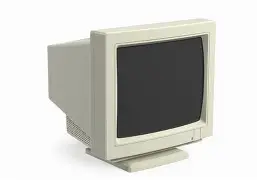
1. CRT Monitor (Cathode Ray Tube)
CRT monitors are one of the oldest types of monitors. They were widely used in the past before flat-screen displays became popular.
Features:
- Uses electron beams to display images
- Bulky and heavy design
- Consumes more power

Advantages:
- Good color accuracy
- Fast response time
Disadvantages:
- Higher energy consumption
- Takes up more space
👉 CRT monitors are now mostly outdated and replaced by modern displays.
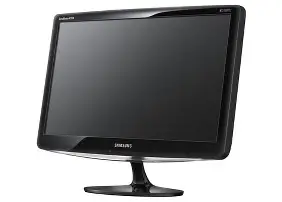
2. LCD Monitor (Liquid Crystal Display)
LCD monitors replaced CRT monitors and became very popular due to their slim design and lower power usage.
Features:
- Uses liquid crystals to produce images
- Thin and lightweight
- Energy-efficient

Advantages:
- Compact design
- Less power consumption
- Clear image quality
Disadvantages:
- Limited viewing angles (in older models)
- Slower response time compared to CRT
👉 LCD monitors are commonly used in homes, offices, and schools.
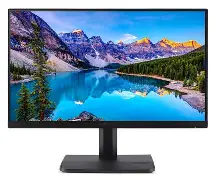
3. LED Monitor (Light Emitting Diode)
LED monitors are an advanced version of LCD monitors. They use LED backlighting instead of traditional fluorescent lights.
Features:
- Brighter display
- Better contrast
- Energy-efficient

Advantages:
- Slimmer than LCD
- Better color quality
- Longer lifespan
Disadvantages:
- Slightly more expensive than LCD
👉 LED monitors are currently the most widely used monitors.
4. OLED Monitor (Organic Light Emitting Diode)
OLED monitors are a newer and more advanced display technology.
Features:
- Each pixel emits its own light
- No need for backlighting
- Extremely thin


Advantages:
- Excellent color accuracy
- Deep blacks and high contrast
- Faster response time
Disadvantages:
- Expensive
- Risk of screen burn-in
👉 OLED monitors are ideal for designers, video editors, and high-end users.
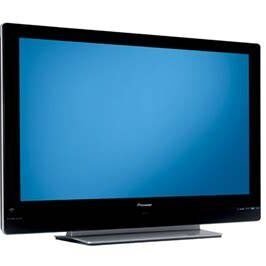
5. Plasma Monitor
Plasma monitors use small cells containing electrically charged gases to produce images.
Features:
- Good color reproduction
- Large screen sizes

Advantages:
- Wide viewing angles
- Smooth motion display
Disadvantages:
- High power consumption
- Heavier and less common today
👉 Plasma monitors are rarely used now due to newer technologies.
6. Touchscreen Monitor
Touchscreen monitors allow users to interact directly with the screen using touch.
Features:
- Supports touch input
- User-friendly interface


Advantages:
- Easy to use
- No need for keyboard or mouse (in some cases)
Disadvantages:
- More expensive
- Can get fingerprints on the screen
👉 Commonly used in smartphones, ATMs, and kiosks.
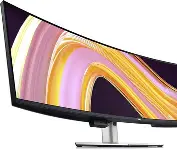
7. Curved Monitor
Curved monitors have a slightly curved screen that enhances the viewing experience.
Features:
- Immersive display
- Reduced eye strain

Advantages:
- Better viewing angles
- Ideal for gaming and movies
Disadvantages:
- Expensive
- Takes more desk space
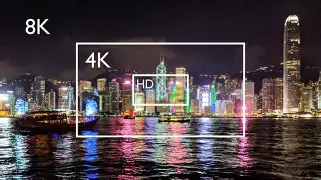
8. 4K and 8K Monitors
These monitors are based on resolution rather than technology.
Features:
- Ultra-high resolution (3840×2160 for 4K)
- Very sharp images

Advantages
- Detailed visuals
- Great for professional work and gaming
Disadvantages
- Requires powerful hardware
- Higher cost
🧠 Conclusion
Monitors have evolved from bulky CRT displays to sleek and powerful modern screens. Each type of monitor has its own advantages and is suitable for different uses. If you need a monitor for basic tasks, an LED or LCD monitor is a great choice. For high-end work like gaming or video editing, OLED or 4K monitors are more suitable.
Choosing the right monitor depends on your needs, budget, and usage. Understanding these types will help you make a better decision when buying a monitor.
NOTE – Always consider screen size, resolution, refresh rate, and panel type before purchasing a monitor. A good monitor not only improves your work efficiency but also enhances your overall experience.