


In a computer system, input devices and output devices play an important role in communication between the user and the computer. Input devices are used to enter data into the computer, while output devices are used to display or produce the results. Without input and output devices, a computer would not be useful because users would not be able to interact with it.
A computer works in three basic steps: Input → Processing → Output. First, the user enters data using input devices. Then the computer processes the data. Finally, the result is shown using output devices.
What are Input Devices?
Input devices are hardware components that allow users to enter data and instructions into a computer. These devices send information to the computer for processing.
Input devices convert user actions into digital signals that the computer can understand.
Examples of Input Devices

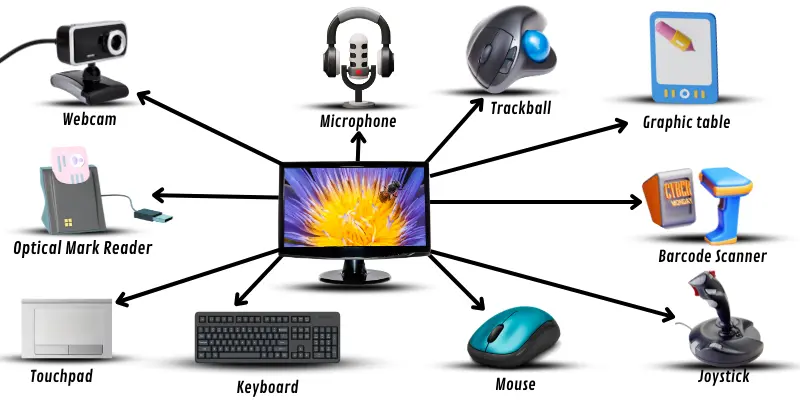
These devices help users communicate with the computer.
Types of Input Devices
1. Keyboard
The keyboard is the most common input device. It is used to type text, numbers, and commands. A standard keyboard contains:
- Alphabet keys
- Number keys
- Function keys
- Control keys
- Arrow keys
The keyboard is widely used in offices, schools, and homes.
2. Mouse
The mouse is a pointing input device. It is used to move the cursor on the screen. A mouse usually has:
- Left button
- Right button
- Scroll wheel
Users can click, drag, and select items using the mouse.
3. Scanner
A scanner is used to convert physical documents into digital format. It scans images and text and saves them in the computer.
Example:
- Scanning documents
- Scanning photos
4. Microphone
A microphone is used to input audio into the computer. It converts sound into digital signals.
Example:
- Voice recording
- Video calls
- Speech recognition
5. Webcam
A webcam is used to capture video and images. It is commonly used for:
- Video conferencing
- Online classes
- Video recording
6. Touchscreen
A touchscreen allows users to interact by touching the screen. It is commonly used in:
- Smartphones
- Tablets
- ATM machines
- Self-service kiosks
7. Joystick
A joystick is used mainly for gaming. It controls movement on the screen.
Example:
- Flight simulation games
- Racing games
What are Output Devices?
Output devices are hardware components that display or present the result of computer processing. These devices receive information from the computer and convert it into a human-readable form.
Output devices allow users to see, hear, or print the results.
Examples of Output Devices
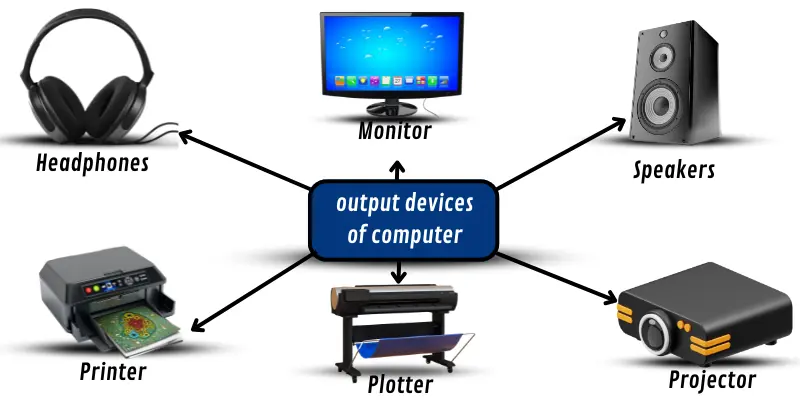
Types of Output Devices
1. Monitor
The monitor is the most common output device. It displays text, images, and videos.
Types of monitors:
- CRT Monitor
- LCD Monitor
- LED Monitor
The monitor is also called Visual Display Unit (VDU).
2. Printer
A printer produces a hard copy of documents. It prints text and images on paper.
Types of printers:
- Inkjet Printer
- Laser Printer
- Dot Matrix Printer
Printers are used in homes, offices, and schools.
3. Speakers
Speakers produce sound output. They are used for:
- Music
- Videos
- Games
- Voice calls
4. Headphones
Headphones are similar to speakers but used for personal listening. They are useful when:
- Listening privately
- Online classes
- Gaming
5. Projector
A projector displays computer output on a large screen. It is used in:
- Classrooms
- Meetings
- Presentations
6. Plotter
A plotter is used to print large drawings and designs. It is commonly used by:
- Engineers
- Architects
- Designers
Difference Between Input Devices and Output Devices
| Input Devices | Output Devices |
|---|---|
| Used to enter data | Used to display results |
| Sends data to computer | Receives data from computer |
| User controls computer | Computer shows output |
| Example: Keyboard | Example: Monitor |
| Example: Mouse | Example: Printer |
Input and Output Cycle
Computer follows this cycle:
Input → Processing → Output
Example:
Input: Type numbers using keyboard
Processing: Computer calculates sum
Output: Result displayed on monitor
Importance of Input and Output Devices
Input and output devices are essential because:
- They allow communication with computer
- They help enter data
- They display results
- They improve user experience
- They make computer useful
Without input devices, users cannot give instructions.
Without output devices, users cannot see results.
Conclusion
Input devices and output devices are important parts of a computer system. Input devices allow users to enter data, while output devices display the processed information. Both work together to complete the input-processing-output cycle. Common input devices include keyboard, mouse, and scanner, while common output devices include monitor, printer, and speakers. These devices make computers easy to use and help users interact effectively with technology.